
Browser · Music player · Downloader · All-in-one

Browse, play, save —
and party all night
with auto-mix.

4.6 · 850+ reviews 50K+ installs v1.5.0 22 MB Android 8.0+

Web Aura is a browser, a full music player and a 6×-thread universal downloader — all in one Android app. Stream or play offline music with thumbnails, run Party Mode auto-mix with zero silence between songs, fetch YouTube captions, pop videos into Picture-in-Picture, save TikTok carousels and Instagram multi-media in one tap, lock private downloads in a vault, run Greasyfork userscripts and Chrome-style extensions, and pick from 1000+ themes — yours to customise.

4.6
Rating
50K+
Installs
22 MB
Size
Free
Forever
Web Aura icon
TikTok Instagram Facebook X Reddit Vimeo SoundCloud Mixcloud

See it · 02

This is Web Aura,
screen by screen.

Every screen on this page is the real app. Tap any phone to inspect it full-size.

🎧 Auto-Mix Party Mode 🔐 Locked Folder ⚡ 6× threads 🎨 1000+ themes
Web Aura theme picker
Web Aura music player
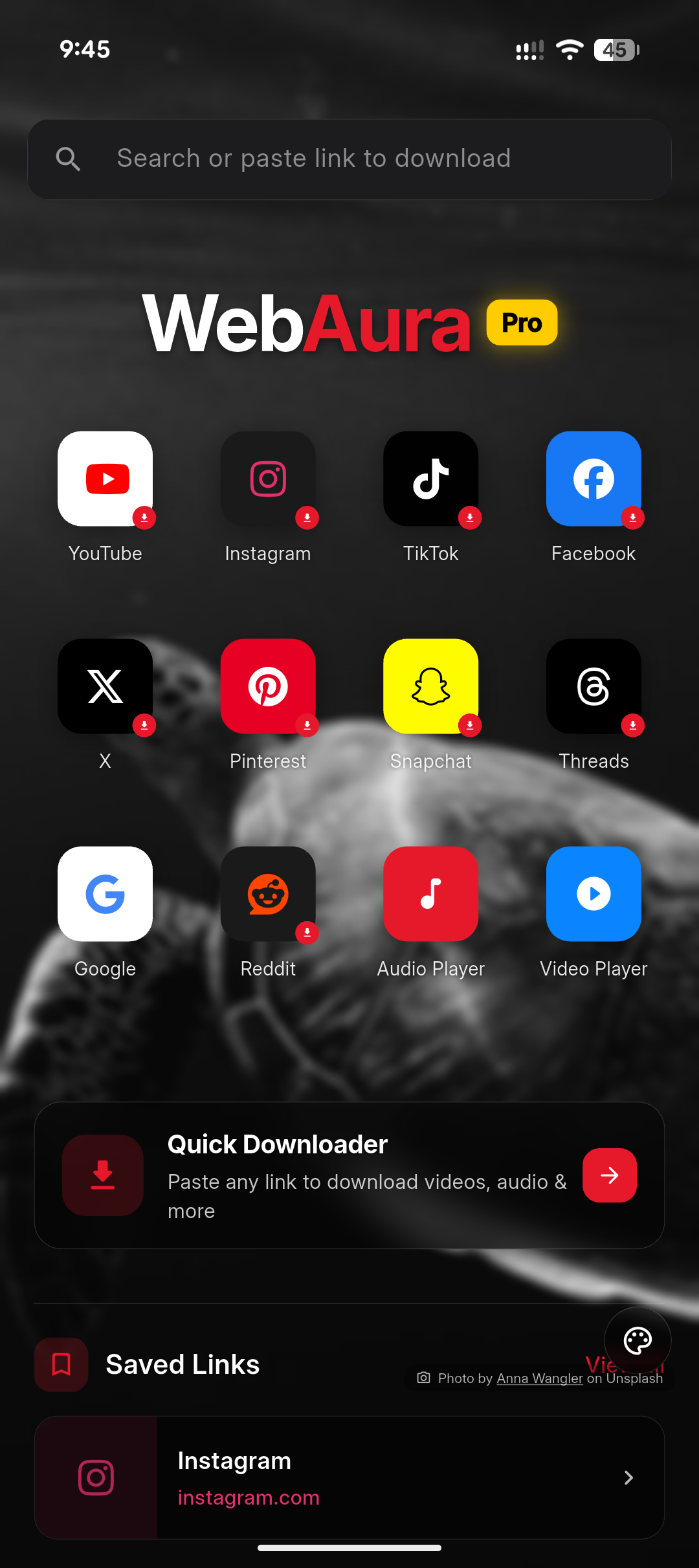
Web Aura home with Quick Downloader
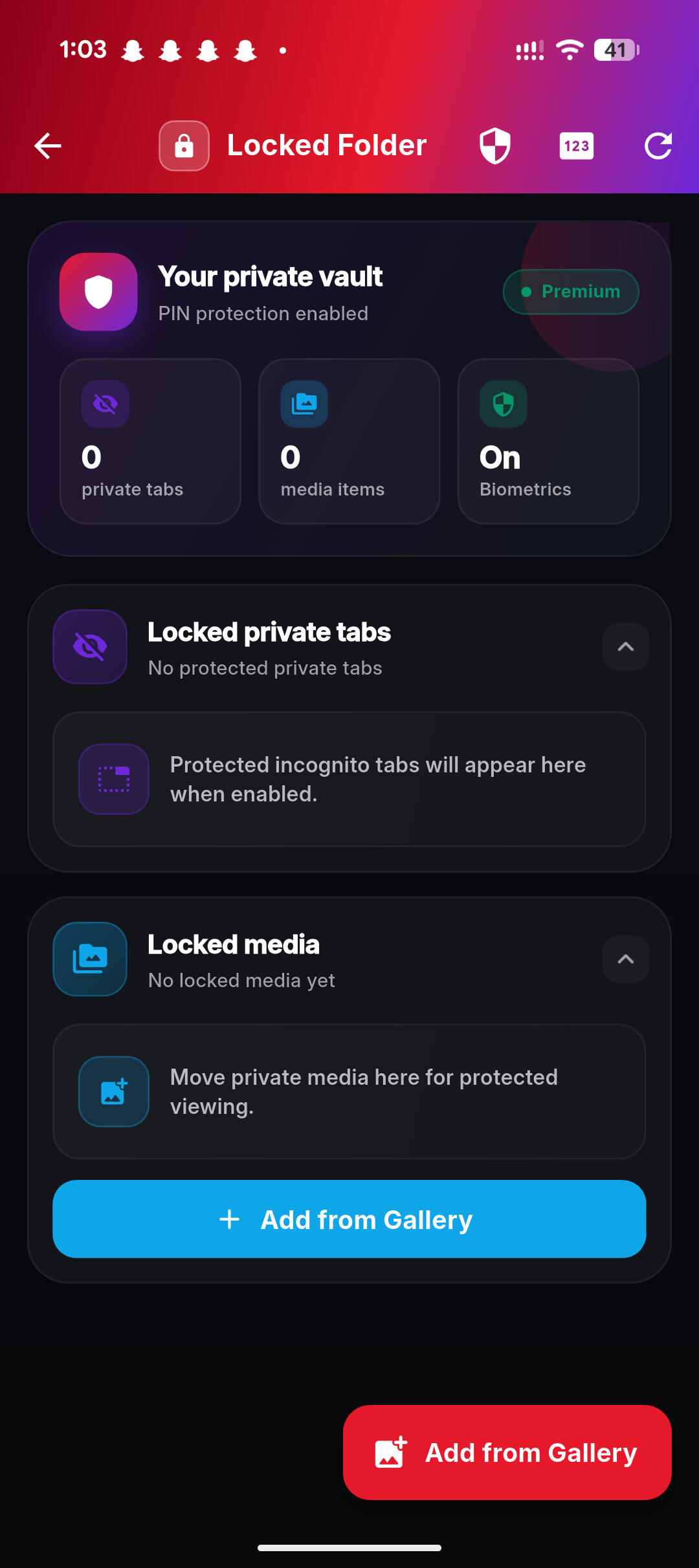
Web Aura locked folder
Web Aura batch playlist downloader

Bonus · Homescreen

Five homescreen widgets,
zero need to open the app.

Web Aura ships with five Android widgets in different sizes — quick browser, music player, downloader tile, locked-folder shortcut and saved-links peek. Drop one (or all of them) on any homescreen. Two of the five are previewed below.

  • 1 Browser widget · search bar + Private / Tabs / Downloads / Saved
  • 2 Music player widget · Now Playing with full controls
  • 3 Quick Downloader tile · paste link, fetch instantly
  • 4 Locked Folder shortcut · biometric-protected vault tap
  • 5 Saved Links peek · latest read-later items at a glance
Web Aura browser homescreen widget
Widget 1 of 5 · Browser quick-action
Web Aura music player Android homescreen widget
Widget 2 of 5 · Music player

Meet Aura · the vibe

One app. Browser, music, downloader — and a tiny mascot who refuses to let the music stop.

Aura keeps your browser fast, your tabs organised, your downloads flowing six lanes deep, your music seamless across silence-free auto-mixes, and your private files locked safely away. Every animation on this page is a real feature inside the app.

Features · 01

30+ features.
One app, endless reach.

Every block below is a real, shipping feature. Animations on this page are previews — install Web Aura to feel them in your hand.

01 · Music & Audio
A full music player built right in.
🎧

Online & offline player

Stream anything online, then save it for offline. Background play with lock-screen controls, sleep timer, queue, equaliser. Cover art and thumbnails attached automatically.

🎉

Auto-mix Party Mode

Tracks blend with crossfade and tempo-aware mixing — no silence between songs. Set it once, the playlist keeps moving until you stop it.

📺

Picture-in-Picture

Pop any online video into a floating window. Keep watching while you scroll, browse or chat in another app.

💬

Captions & subtitles

Auto-fetches subtitles for video links and pulls captions from YouTube. Turn them on, off or pick a language — even on saved videos.

🎼

Audio detection

Visit any site with music or audio files and Web Aura quietly highlights them. One tap to play, one to save offline.

🔍

Audio search

Search across web sources for tracks, podcasts and ambient audio without ever leaving the player.

02 · 6× Universal downloader
Everything saves — fast.

6× download threads

Splits any download into six parallel lanes. Big videos, full albums and HD playlists arrive measurably faster — even on weak networks.

🌙

Background downloading

Lock the screen, switch apps, take a call — downloads keep going. Smart resume picks up where it left off if the network drops.

📋

Many playlists at once

Paste several playlist URLs and Web Aura saves every track from every list in parallel — YouTube, SoundCloud, Mixcloud, Spotify links and more.

🖼️

TikTok carousels & IG multi-media

One link → every image and video. TikTok image carousels, Instagram carousel posts and reels, Pinterest galleries — all saved in their original quality.

🪄

Sites without download buttons

If the page can show it, Web Aura can save it. Auto-extracts media even when the site hides downloads behind paywalls or button-less players.

📲

Share → instant download

From any app, tap Share → Web Aura. The download starts before you even open the app.

Quick downloader tile

A homescreen widget tile — paste once, fetch instantly. The fastest path from "I want this" to "saved".

▶️

Auto-play full media

Sites that lazy-load or chunk their media auto-play in the background while Web Aura quietly captures the full file.

03 · Browser suite
Every browser feature you actually use.
🗂️

Grouped tabs

Drag tabs into colour-coded groups for work, music, research and shopping. Restore a whole group with one tap.

⬇️

Bottom navigation

Address bar and controls live at the bottom — designed for one-hand use on big-screen phones.

🧹

Reader mode

Strips ads and clutter from articles. Adjustable fonts, line height, themes and a TTS read-aloud option.

📥

Bookmark import & export

HTML import from Chrome, Firefox or Safari; one-click export. Your bookmarks belong to you, not your browser.

📚

Read-later list

Save anything offline. Sync across your Web Aura devices when you sign in — or keep it local with anonymous mode.

🚫

Built-in ad blocker

Page-level ad and tracker blocking. Faster pages, lower data, calmer screens.

04 · Privacy & safety
Your stuff stays yours.
🔐

Locked folder

A pin/biometric-locked vault for private downloads, screenshots and documents. Hidden from the gallery, hidden from the share-sheet.

🥷

Incognito tabs & media

Browse and download without history, cookies or thumbnails. Incognito mode also shields downloaded media from showing up in the gallery.

🛡️

Incognito Safe Mode

Hardens incognito with phishing detection, fingerprint protection and forced HTTPS. The paranoid setting you'll actually leave on.

⚠️

Real-time link safety

Phishing and malware checks happen before the page loads. Dangerous URLs are flagged with a clear, plain-English warning.

🧱

Tracker & fingerprint block

Third-party trackers, social pixels and fingerprinting scripts are blocked by default. See exactly what was stopped on each site.

👤

Google or anonymous account

Sign in with Google for cross-device sync, or pick a generated anonymous identity with a custom emoji avatar — no email required.

05 · AI & smart tools
A browser that reads for you.
🤖

AI page summary

Long article? Tap summarise. Get the key points in 30 seconds. Works on saved articles too — even fully offline once cached.

🌐

Multi-engine AI search

Pick from several AI search engines for different jobs — quick lookups, deep research, code questions, image generation. Default engine remembered.

📡

Offline mode

Saved articles, summaries, music and downloaded videos all work without a signal. Web Aura is just as useful on a plane.

🎯

Smart capture

Long-press any image or video on a page to save instantly to your library or vault.

🔗

Link saver + sync

Stash links for later with one tap. Sync across your devices when signed in, with optional reminder notifications.

🧩

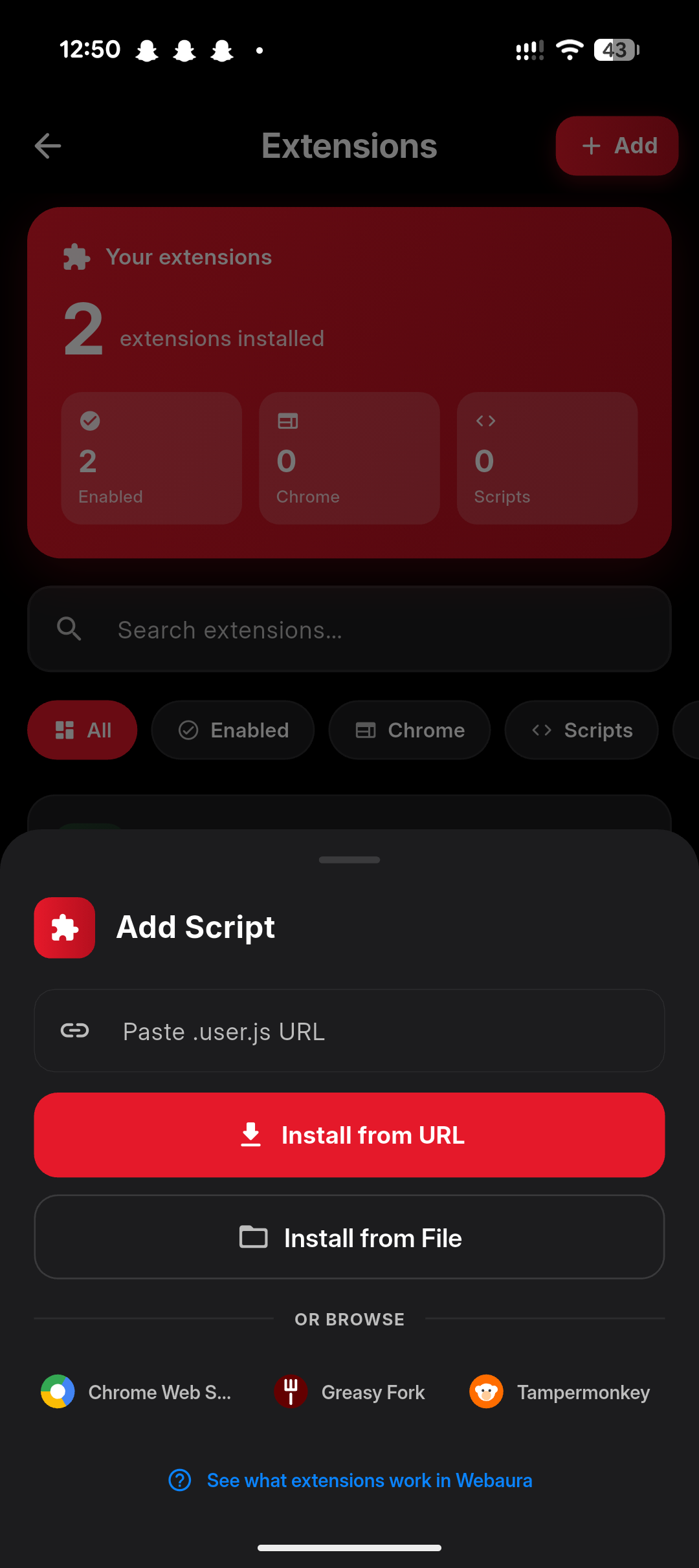
Userscripts & extensions

Greasyfork & OpenUserJS userscripts plus Chrome-style content-script extensions. Customise any site. See compatibility →

06 · Customisation
A browser you can repaint.
🎨

1000+ themes & wallpapers

A built-in gallery of over a thousand curated browser themes — gradients, illustrations, photography, anime, minimalist. New packs drop every month.

🖼️

Add your own image

Don't see one you love? Drop in any picture from your gallery and Web Aura skins the whole browser around it — accent colours included.

🌙

True OLED dark

Pitch-black background, low-blue text. Easy on the eyes, easy on the battery — paired with whichever theme you've picked.

☁️

Optional Google sync

Sign in with Google to sync bookmarks, history, read-later, themes and link-saver across devices.

🏆

Aura Points

Earn points just by using Web Aura. Trade them for premium themes, fancy avatar packs and feature unlocks — no subscription.

🛠️

Chrome-style extensions

Content-script Chrome Web Store extensions are supported. Bring the productivity tools you already trust to your phone. Compatibility →

1 Music · Audio

A real music player,
not a download list.

Stream online, play offline, drop in any link. Auto-mix Party Mode crossfades tracks with no silence between them. Tap the cover for full lyrics — even translated. Move tracks straight into the locked folder when they're yours and yours alone.

Auto-mix
320kbps
Top quality
Offline
All saved
🎼

Live audio waveform

Piano-key visualiser dances in time with whatever's playing. Background gradient shifts with the mood.

💬

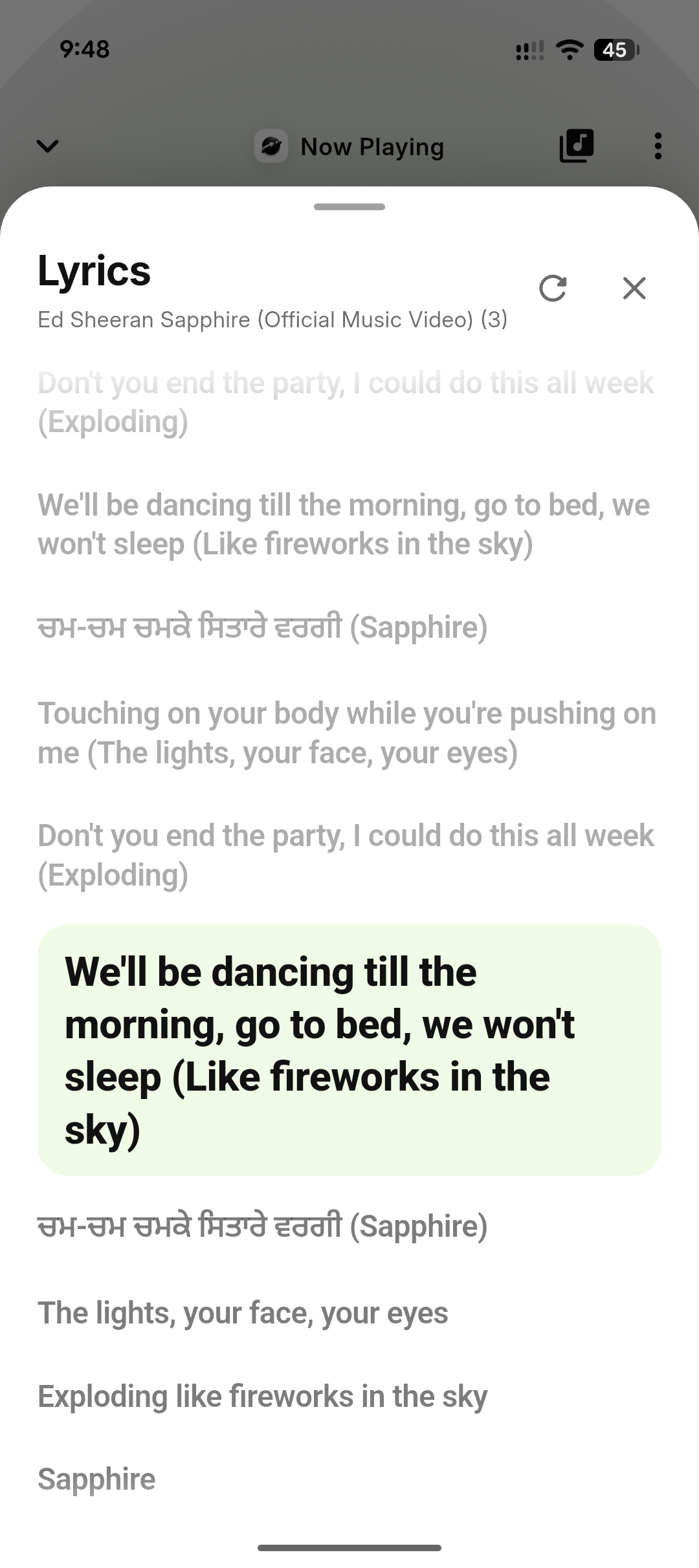
Translated lyrics

Pull lyrics from the web, then translate to your language inline. Synced line-by-line as the track plays.

🔐

Private tracks

Move any song into the locked folder — hidden from the gallery, hidden from share-sheet, biometrics to unlock.

Web Aura Now Playing screen with piano keyboard waveform
Web Aura online music search
Online music search
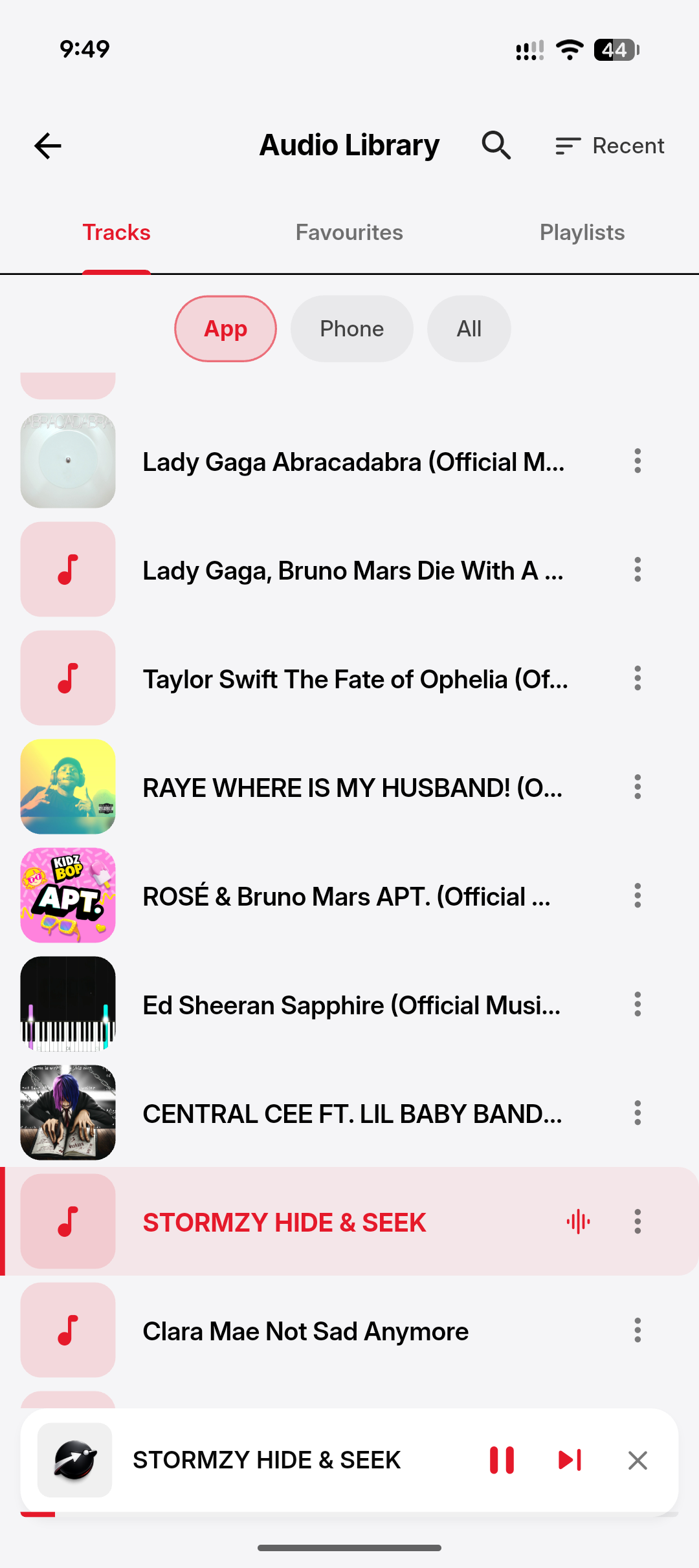
Web Aura audio library with downloaded tracks
Audio library
Web Aura translated lyrics view
Translated lyrics
Web Aura now playing options menu
Player options
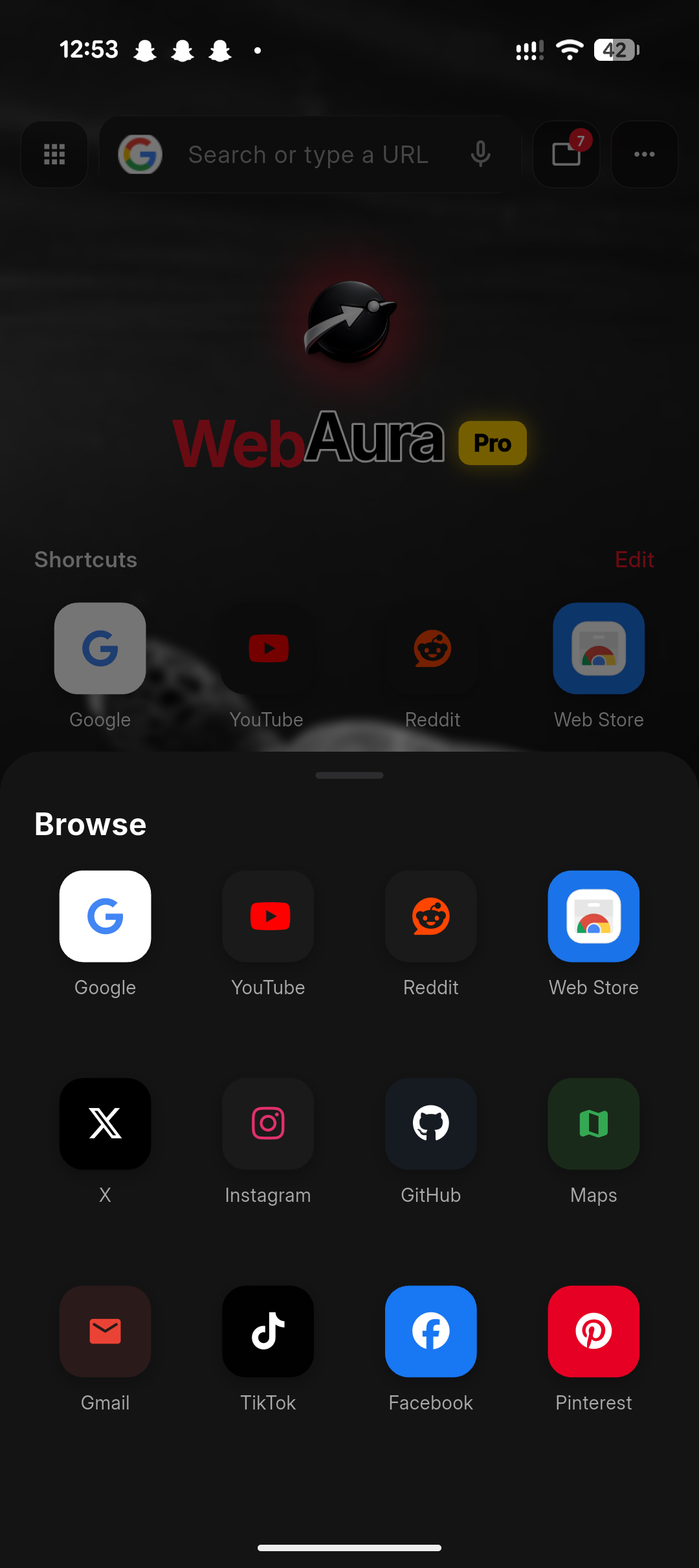
Web Aura browser home with bottom search bar

2 Browser · Tabs

A browser that respects
your thumb.

Bottom search bar, social shortcuts one tap away, swipe-up Browse menu, page tools that actually work — Read mode, Translate, Save offline, Add to Home, Find in page. Built for the phone you hold one-handed on the bus.

⬇️

Bottom navigation

Address bar, share, tabs and back — all where your thumb already is. Top bar is opt-in.

🗂️

Grouped tabs

Drag tabs into colour-coded groups for work, music, research. Restore the whole group with one tap.

🧹

Reader mode + translate

Strip ads, change typography, listen aloud, translate the page in place. Built into the page menu.

Web Aura home with quick downloader
Home + Quick Downloader
Web Aura browse menu with social shortcuts
Browse shortcuts
Web Aura page menu with reader mode
Page menu
Web Aura media gallery showing app and device media
Media gallery

3 Downloader · 6× threads

Every link, every quality,
six lanes deep.

Paste a YouTube playlist link, select 39 tracks, pick 360p or 1080p, hit download. Subtitles fetched automatically. Background service keeps draining the queue while you do anything else. TikTok carousels and Instagram multi-media saved as one labelled gallery, no watermark.

35+
Platforms
Threads
4K
Top resolution
📋

Batch playlist download

Pick which tracks, pick the quality. Web Aura queues all of them and saves with proper file names + cover art.

💬

Subtitles & captions

Auto-fetches subtitles for video links and pulls captions from YouTube. Toggle, language-pick, store offline.

Quick Downloader tile

Homescreen widget — paste a link, fetch instantly. The fastest path from "I want this" to "saved".

Web Aura batch playlist downloader with quality picker
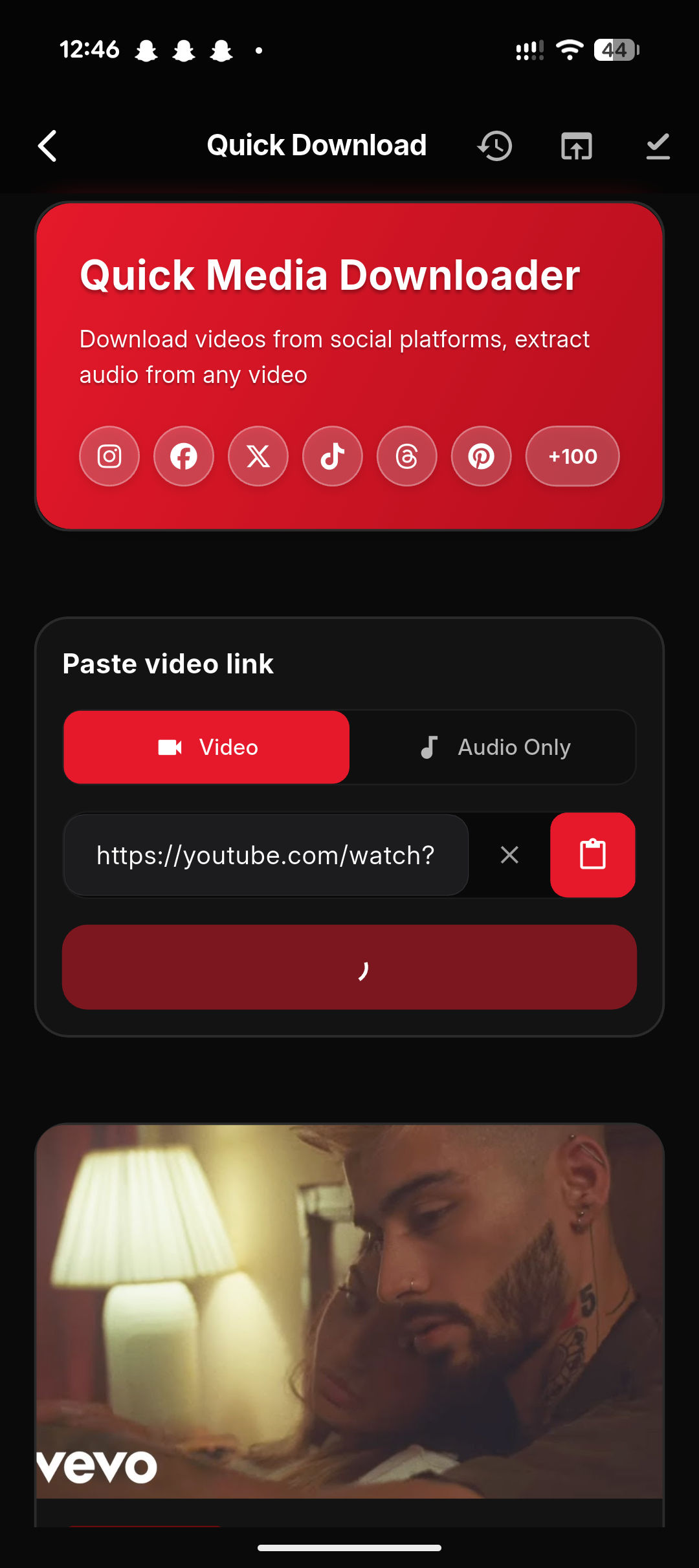
Web Aura quick media downloader
Quick downloader
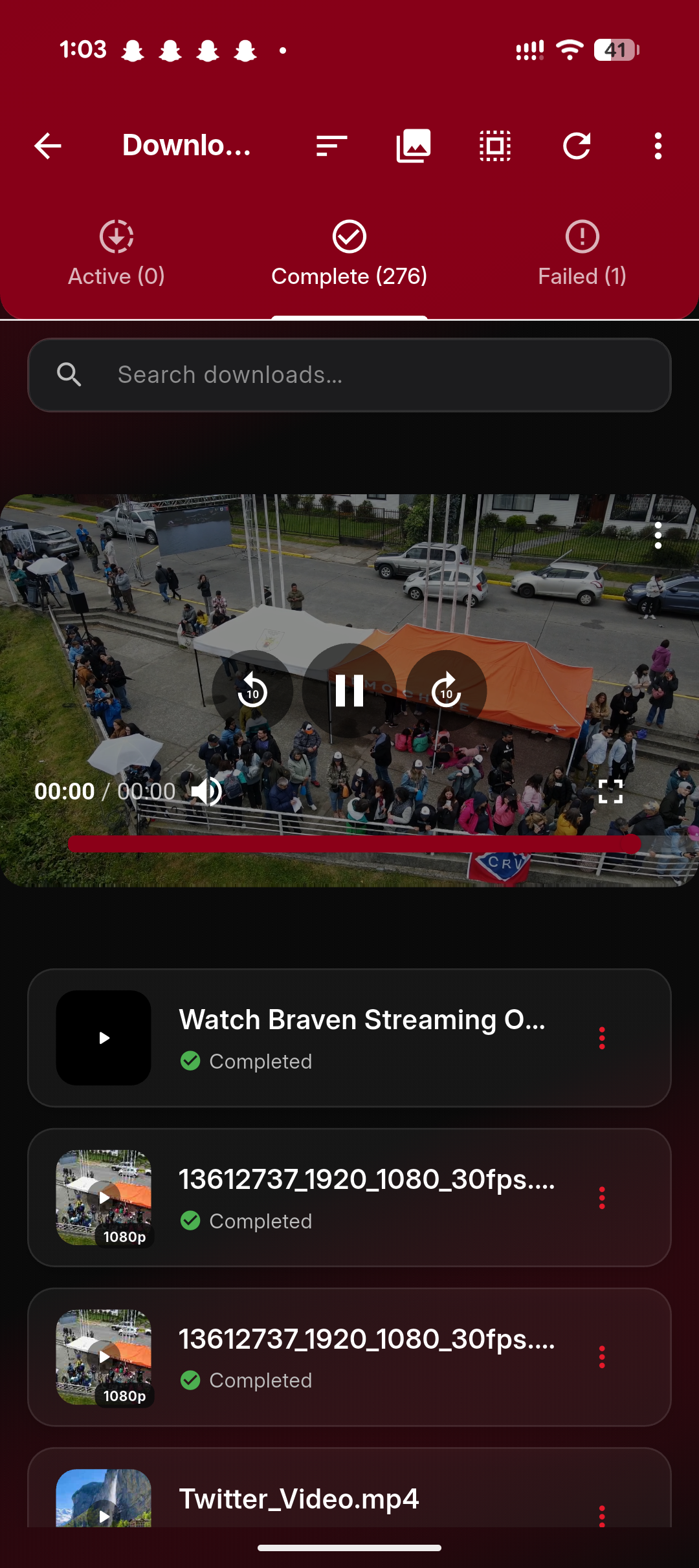
Web Aura downloads manager
Downloads manager
Web Aura import audio from link
Import from link
Web Aura subtitles fetcher
Subtitles fetch
Web Aura locked folder

4 Privacy · Locked vault

A vault inside the vault.

Move any download, screenshot or document into the locked folder. Biometric or PIN unlock. Hidden from the gallery, the share sheet, search results, and even file managers. Tabs in incognito don't write to history. Real privacy, not theatre.

🔐

Biometric unlock

Fingerprint or face unlock per session. Wrong PIN three times → stay locked.

🥷

Incognito tabs & media

No history, no cache, no thumbnails. Private mode shields downloaded media from the gallery too.

🚫

Tracker & ad block

Built-in blocker stops third-party trackers, social pixels and fingerprinting. See what was stopped per site.

Web Aura settings privacy
Settings
Web Aura userscript extensions
Extensions
Web Aura media gallery
Media gallery
Web Aura theme picker
Customise themes

5 Customisation

A browser you can repaint.

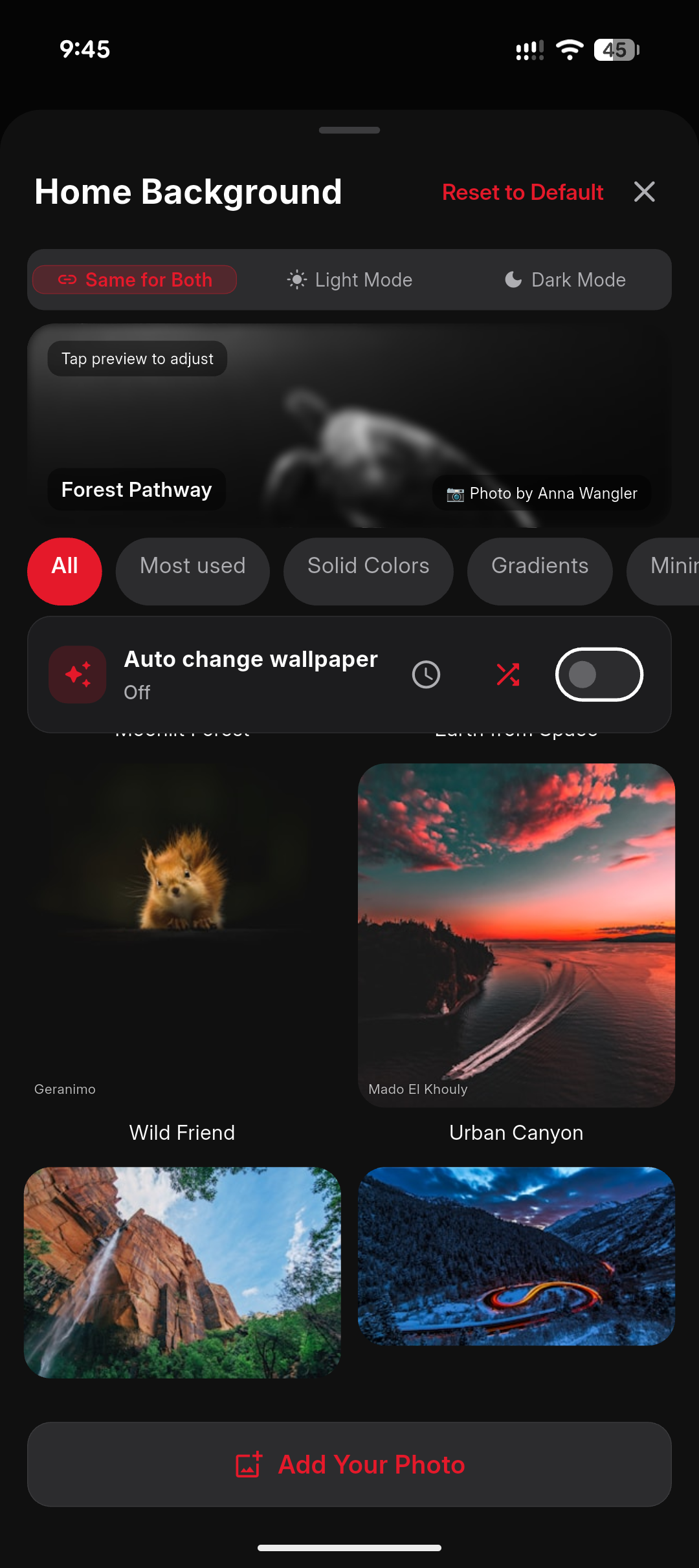
Pick from 1000+ curated themes — gradients, photography, illustrations, anime. Or drop in any photo from your gallery and Web Aura repaints accent colours around it automatically. Different theme for light and dark mode? Set both at once.

1000+
Themes
Your photos
Auto
Light/Dark
🎨

Curated theme packs

Solid colours, gradients, photography, illustrations, minimalist — new packs every month.

🖼️

Add your own

Drop in a photo. Web Aura extracts the dominant colour and skins the entire UI around it.

🌗

Light + dark together

Pick one theme for light mode, another for dark — Web Aura auto-switches with your system.

Web Aura customise themes screen

Every screen · 06

The whole app, looping.

Hover to pause · tap any screen for full size

Home
Bottom search bar
Browse shortcuts
Now Playing
Audio library
Batch playlist download
Quick downloader
Downloads manager
Locked folder
Customise themes
Home
Bottom search bar
Browse shortcuts
Now Playing
Audio library
Batch playlist download
Quick downloader
Downloads manager
Locked folder
Customise themes

Headline features · 07

Three things Web Aura does better
than anyone else.

Video player & downloader,
built into the browser.

Stream MP4, MKV, M3U8 (HLS) and WEBM directly inside Web Aura. Then save in 2160p, 1080p, 720p or 480p with a one-tap quality picker. No external app, no watermark, no ads in the player.

MP4 M3U8 / HLS MKV WEBM DASH
Quality picker
2160p · 4K230 MB
1080p130 MB
720p100 MB
480p80 MB

AI-powered ad blocker.

Blocks doubleclick.net, googletagmanager, applovin, fbcdn and 3,000+ tracker domains before the page paints. Faster pages, lower data, calmer screens.

61%
of pages tried
to serve ads.
None did.

Six lanes deep.
Faster downloads.

Splits each download into six parallel chunks, then stitches them back. 2–5× the speed of single-thread tools — even more on flaky mobile networks where each chunk retries independently.

Parallel
threads

1,000+ themes.
Or drop in your own.

Curated wallpaper packs across gradients, photography, illustrations and anime. Or pick any photo from your gallery — Web Aura extracts the dominant colour and skins the entire UI around it.

PINK SUNSET FOREST NIGHT

Web Aura everywhere
your stuff lives.

Web Aura is built mobile-first but runs across the Apple ecosystem too — including Apple Silicon Macs and iPads. Windows is on the roadmap.

Android Available
iPhone Available
iPad Available
Mac Apple Silicon
Windows Coming
Tablets Native fit

Run real extensions.
From the desktop web.

Most Chrome Web Store extensions work in Web Aura — ad blockers (uBlock Origin, AdBlock, Adblock Plus, Ghostery), password managers, content enhancers, productivity tools and userscripts. The two categories that don't work: themes (Chrome's theming API isn't available in Android WebView) and non-injecting extensions like games, calculators and embedded apps that need their own popup/new-tab window.

Most Chrome Store work Ad blockers ✓ supported 2,500+ Greasyfork scripts Sandboxed per-site

Heavy extensions (large filter lists, video processors) take a few seconds to spin up on first load. If a freshly installed extension isn't responding, swipe Web Aura away from your recents and re-open — that re-injects the script bundle.

Tampermonkey scripts
Greasyfork
uBlock Origin
AdBlock
Adblock Plus
Ghostery
SponsorBlock
Dark Reader
Grammarly
LastPass
Bitwarden
Honey
Pocket
Notion Web Clipper
Stylus CSS
Violentmonkey
Reddit RES
Wayback
Enhancer for YouTube
+
3,000 more

Bigger screens · 08

Looks great on tablets.
Runs native on Macs.

Web Aura's iPad layout uses every pixel — bigger thumbnails, a wider music player, sticky settings sidebar. On Apple Silicon Macs the same iPad app installs natively from the Mac App Store.

Web Aura
webaura://home

Apple Silicon · Mac App Store

Apple Silicon Macs (M1, M2, M3, M4) run iOS apps natively. Search "Web Aura" on the Mac App Store, install in one click, run in a window like any native macOS app — same browser, same music player, same locked folder.

Get started · 02

From install to first save —
in 4 quick steps.

01

Install Web Aura

Free on Google Play (Android) or App Store (iOS). Beta tier — fast updates.

02

Add to your share sheet

On first launch, allow share-sheet integration in three taps. Done.

03

Browse like normal

Use Chrome, Firefox or Safari — Web Aura works alongside, never replaces.

04

Send links to Web Aura

Hit share → Web Aura → choose tool. Download, read, save, check, summarise.

What users say · 03

4.6 from 850+ reviews.

★★★★★
"AI summarise actually works. I read more articles now because the bar is lower."
★★★★★ — App Store review
★★★★★
"The link safety check caught a phishing URL my friend texted me. Saved me."
★★★★★ — Play Store review
★★★★★
"I love that I don't have to sign up. Anonymous mode is brilliant."
★★★★★ — Play Store review

Made for · 04

Who actually uses this?

📰

Long-form readers

Strip ads, cookie banners and clutter. Adjust line height, font and theme. Save articles for offline reading.

🛡️

Security-conscious users

Phishing and malware link checking before you tap. Built-in ad and tracker blocker. OLED dark mode.

🎓

Researchers & students

AI page summary in 30 seconds. Save anything to read-later. Sync across devices via Google sign-in.

💾

Power downloaders

One share-sheet tap to download videos, images or audio from any public link. No tab juggling.

🌐

Browser-curious

Use alongside Chrome, Firefox or Safari. Web Aura adds tools without replacing the browser you already use.

🔒

Privacy-first folks

Anonymous identity option — no Google sign-in required. Just a generated nickname and emoji avatar.

🎵

Music listeners

Save full playlists offline, listen with auto-mix in the background, build a personal library — all without monthly streaming subscriptions.

⚙️

Web tinkerers

Run Greasyfork userscripts and Manifest-V2-compatible extensions to remix any site. Block elements, auto-fill, custom themes — your browser, your rules.

Technical specs · 05

Under the hood.

Latest version
1.5.0
App size
22 MB (Android) · 28 MB (iOS)
Min Android
8.0 (Oreo) and up
Min iOS
iOS 14.0 and up
Languages
34+ supported
Content rating
12+
In-app purchases
Pro subscription · Lifetime · Aura Points
Last updated
April 15, 2026
Permissions
Internet, Storage, Notifications, Camera, Audio playback
Offline mode
Read-later list

Languages · 06

Speaks 34+ languages.

English Spanish French German Portuguese Italian Dutch Polish Russian Ukrainian Czech Romanian Hungarian Greek Swedish Danish Norwegian Finnish Turkish Arabic Persian Hindi Bengali Urdu Tamil Indonesian Malay Vietnamese Thai Filipino Japanese Korean Chinese (Simplified) Swahili

Permissions · 07

What we ask for, and why.

Every permission has a clear purpose. We don't ask for anything we don't actively use.

Internet
Core requirement — Web Aura is a browser companion. All page content and AI summaries flow through here.
Storage
To save read-later articles, downloaded media and bookmarks locally.
Notifications
For download-complete alerts and (optional) read-later reminders.
Camera
Used only when you scan a QR code. Off-by-default; requested per-use.
Audio playback
Plays your saved tracks and streams in the background. Requests media-playback control to keep audio running while you switch apps.
Foreground service
Keeps the audio player and downloads alive when you lock your phone or use other apps. A persistent notification shows what's playing/downloading.

What's new · 08

Recent updates.

v1.5.0
Apr 15, 2026

🧩 Extension support launched — install Greasyfork userscripts, OpenUserJS scripts and Manifest-V2 web extensions. Per-site permission sandbox. Manage installed scripts in Settings.

v1.4.8
Mar 03, 2026

🎚️ Auto-mix & gapless playback — tempo-aware crossfade between tracks. Configurable 1–12 seconds. Sleep timer added.

v1.4.6
Feb 11, 2026

🎧 Built-in audio player — stream online or play offline. Background playback. Lock-screen controls. Save full playlists offline from public URLs (YouTube, SoundCloud, Mixcloud).

v1.4.5
Jan 25, 2026

iOS 'Delete All Data' flow. Improved Aura Points restore reliability. Faster page summaries.

v1.4.0
Dec 12, 2025

Read-later sync via Google. Anonymous identity revamp (custom emoji + colour). Native ad factories.

v1.2.0
Oct 03, 2025

AI summary launched. Link safety check upgraded with real-time database.

v1.0.0
Jul 08, 2025

Web Aura goes public on Google Play and Apple App Store (iOS App ID 6763145076).

vs. the rest · 09

One app. Three jobs.
Better than the specialists at each.

We benchmarked Web Aura against the most-installed and most-trending app in every category. Here's the honest read — features we win on, features we tie on, features we still owe.

Category 01 · Browsers

Web Aura vs Chrome, Brave, Firefox, Opera, Samsung Internet

The most-used mobile browsers all do the same thing — render web pages. Web Aura renders web pages and downloads from them, plays media, manages playlists, runs userscripts, and locks private files away.

Feature Web Aura Chrome Brave Firefox Opera GX Samsung
Bottom navigation bar YesNo No No No Yes
Built-in media downloader 35+ sitesNo No No No No
Built-in music player Online + offlineNo No No No No
Greasyfork userscripts NativeNo No LimitedNo No
Chrome-style content extensionsYesNo No Yes No Limited
AI page summary YesGemini paidLeo No Aria No
Multi-engine AI search YesNo Leo onlyNo Aria onlyNo
Picture-in-Picture for any siteYesSome sitesSome sitesSome sitesSome sitesYes
Built-in ad & tracker blockYesNo Yes Yes Yes Yes
Locked folder / vault Built-inNo No No No Secret mode
Customisable themes (1000+)1000+~10~6~8~30~5
Bookmark import & exportYesYes Yes Yes Yes Yes
Anonymous-only sign-in YesGoogleYes Yes AccountSamsung
Aura Points (earn premium)YesNo BAT No No No
⬇️
Only one with download + music

Chrome, Brave, Firefox, Opera and Samsung all stop at "render the page". Web Aura is the only mainstream browser that also downloads media and plays it back.

🧩
Native Greasyfork on Android

Firefox tries via add-ons but it's brittle. Web Aura runs userscripts straight from Greasyfork, OpenUserJS, or pasted source.

🎨
1000+ themes, not 10

The competition gives you a handful of skins. Web Aura ships a thousand+ wallpapers and lets you drop in your own image.

Category 02 · Downloaders

Web Aura vs TubeMate, Vidmate, SnapTube, 4K Video Downloader, Y2Mate

Most "downloaders" only chase YouTube. Most are ad-stuffed shells around yt-dlp. Web Aura threads six lanes wide, hits 35+ platforms, fetches subtitles and saves carousels — clean.

Feature Web Aura TubeMate Vidmate SnapTube 4K Downloader Y2Mate
Platforms supported 35+~5~12~50 (ad-driven)~10~6
Parallel download threads
Background downloading YesYesYesYesDesktop onlyNo
YouTube playlist batch + qualityYesNoNoLimitedYesOne-by-one
TikTok carousel + IG multi-mediaNativeNoNoFirst image onlyNoSingle only
Subtitles + YouTube captions Auto-fetchNoNoNoYesNo
No watermark output AlwaysMost sitesYesYesYesSometimes
MP3 audio extraction YesYesYesYesYesYes
Built-in browser to find mediaFull browserMiniMiniMiniNoWeb only
Locked folder for downloads YesNoNoNoNoNo
Free, no ads stuffed in Yes (gentle ads)Banner adsHeavy adsHeavy adsPaid for HDPop-up ads
On Play Store / App Store BothSideload onlySideload onlySideload onlyBothWeb only
6 lanes, not 1

While TubeMate/Vidmate stream a single segment, Web Aura splits each file into six parallel chunks. 2–5× faster on a fast network, even more on flaky connections.

🖼️
Carousels work properly

SnapTube grabs only the first image of an Instagram carousel. Web Aura saves every image and video as one labelled gallery, no watermark.

🛡️
Play Store, not sideload

TubeMate, Vidmate and SnapTube were banned from Google Play. You install them from sketchy APKs. Web Aura is on both Google Play and App Store, signed and reviewed.

Category 03 · Music players

Web Aura vs Spotify, YouTube Music, Apple Music, VLC, Poweramp

Spotify and YT Music demand a subscription. VLC won't auto-mix. Poweramp is paid and offline-only. Web Aura is the only one that streams free, plays offline, mixes party-style, and saves any link as a track.

Feature Web Aura Spotify YT Music Apple Music VLC Poweramp
Free forever (no subscription)Yes$11.99/mo$10.99/mo$10.99/moYes$5 once
Stream music online From any linkSpotify onlyYT onlyApple onlyNoNo
Save any track for offline FreePremiumPremiumPremiumN/AYes (you bring files)
Auto-mix Party Mode (no silence)YesCrossfade onlyCrossfade onlyCrossfade onlyNoYes
Tempo-aware blending (BPM) YesNoNoNoNoNo
Translated lyrics YesLyrics onlyLyrics onlyLyrics onlyNoNo
Save full playlist from URL From any sourceSpotify URLs onlyYT URLs onlyApple onlyNoNo
Equaliser + DSP YesPremiumPremiumYesYesBest in class
Lock-screen + bg playback YesYesYesYesYesYes
Locked folder for tracks YesNoNoNoNoNo
Picture-in-Picture (videos) YesNoPremiumPremiumYesNo
Audio detection on web pages YesNoNoNoNoNo
🆓
Zero subscription

Spotify, YT Music and Apple Music charge $10–$12/month. Web Aura is free forever — even the offline downloads.

🎉
Real DJ auto-mix

Streaming services do basic crossfade. Web Aura analyses BPM and key per track, then blends seamlessly — no silence between songs, ever.

🌐
Any link, any platform

Spotify only plays Spotify URLs. Web Aura plays anything — YouTube, SoundCloud, Mixcloud, Bandcamp, even raw MP3 links from a forum.

One install. Three specialists retired.

Web Aura replaces a browser, a downloader and a music player on your phone — and beats each at the things they're known for. Free forever, no subscription, no watermark, on Google Play and App Store.

3 → 1
Apps replaced
$0
Subscription
22 MB
Total size
4.6★
Rating

Get involved · 10

Gift cards, bulk codes,
share & co-marketing.

Pick a template — your request lands directly in the support inbox with all the right details already filled in. Most replies inside 48 hours.

🚀

Influencer bulk codes

Got an audience? We'll send you a sheet of redeem codes to give your followers — every redeem credits you. Free for verified creators.

  • 10–500 codes per batch, depending on reach
  • Pro Lifetime codes for top creators
  • Trackable links so you see redeem stats
  • Co-marketing — we share your post, you share ours
  • Affiliate revenue on Aura Points purchases
Apply as creator
📣

Share & make news

Writing about Web Aura? Press kit, founder quote, custom screenshots, exclusive features — we'll get you set up.

  • Press kit — logos, colours, factsheet, screenshots
  • Founder Q&A — quotes, written or recorded
  • Embargo / exclusive first-look on new features
  • Custom screenshot renders for your article
  • App Store listing co-promo on launch day
Get press resources
✉️

Got something else in mind?

Custom partnership, beta access, university lab licence, school programme, accessibility tester pack — write a freeform email and we'll figure it out together.

Email support

FAQ · 11

Frequently asked.

How does the audio player handle online vs offline?
Both natively. Stream tracks from public links when you're online, or download them to your local library to play with no connection. The same player UI handles both — just look for the offline indicator on each track.
Can I really save a whole playlist for offline?
Yes. Paste a public playlist URL (YouTube, SoundCloud, Mixcloud, etc.), pick the audio quality (96 kbps to 320 kbps), and Web Aura queues every track for offline download. Playlists also auto-update when new tracks are added on the source — toggle in Settings.
What does "auto-mix" actually do?
Crossfade plus tempo-aware blending between tracks. Web Aura analyses BPM and key on save, then transitions are seamless — no silence, no jarring cuts. Set crossfade duration in Settings (1–12 seconds) or disable for purist gapless playback.
Are Greasyfork userscripts and Chrome extensions safe?
Web Aura sandboxes every script and extension. Each one runs with explicit per-site permissions you grant before installation. We recommend installing only from trusted sources like Greasyfork or OpenUserJS. Manage and revoke permissions any time in Settings → Extensions. Full breakdown of what's supported on the extensions page.
Which extensions actually work in Web Aura?
Userscripts (Greasy Fork, OpenUserJS, direct .user.js URLs, pasted source, local files) and Chrome Web Store extensions whose work is mainly content-script injection. Tampermonkey, Violentmonkey, uBlock Origin, AdBlock and Ghostery aren't supported because they need browser-level APIs that Android WebView doesn't expose — Web Aura already has its own built-in script manager and ad blocker filling those roles. See the supported extensions page for a complete list, real examples and a compatibility matrix.
Is Web Aura a full browser or a companion?
Both. You can use it as a primary browser, OR keep your existing browser (Chrome, Firefox, Safari) and use Web Aura via the share sheet for downloads, summaries and link checks. Most users mix both.
What are Aura Points?
An in-app reward system. Earn points by viewing rewarded ads, spend them on premium features (longer summaries, more downloads, advanced reader options). Lets you access Pro features without a subscription.
Do I need a Google account?
No. Anonymous mode generates an identity from a code, nickname and emoji avatar — usable across all features except cross-device sync. Sign in with Google only if you want bookmarks/history/tabs to follow you between devices.
How does the AI summary work?
Web Aura sends the visible page text to a summarisation backend (hosted on Koyeb), receives a 3–5 sentence summary, and shows it in-app. The full text isn't stored. Disable AI features any time in Settings.
Is it really safer than Chrome?
Web Aura adds extra link safety checks (real-time phishing/malware lookup) and a built-in ad/tracker blocker that don't ship with Chrome by default. Use it alongside or instead — it's complementary.
Does Web Aura sell my data?
No. We do not sell personal data. Read the full Privacy Policy for the complete list of which third parties (Firebase, Google Mobile Ads, Apple/Google Stores, Koyeb) handle which data and why.
How big is the app?
22 MB on Android, 28 MB on iOS. Loads instantly. Memory footprint is comparable to a single Chrome tab.
Can I delete my account fully?
Yes — see the data deletion page. Two paths: in-app self-service (immediate) or email request (≤30 days). Apple's iOS 'Delete All Data' option is also supported.
What's in the locked folder?
A pin/biometric-locked vault inside Web Aura. Move private downloads, screenshots and documents into it — they vanish from the gallery, the share sheet and search results. Even file managers can't see them. Unlock once per session with a fingerprint, face unlock or PIN.
Does Picture-in-Picture work for any video?
Yes for any standard online video Web Aura can play (HTML5, HLS and DASH). Tap the PiP button (or swipe down with the player open) and the video pops into a floating window you can drag anywhere. Continue browsing, chatting or scrolling without missing a frame.
How do TikTok carousel and Instagram multi-media downloads work?
Paste the post URL or hit Share → Web Aura. Web Aura detects every image and video in the carousel/multi-post, fetches each at original quality (no watermark), and saves them as a single labelled gallery. Same flow for Pinterest galleries.
Can I really pick from 1000+ themes?
Yes. The built-in gallery has 1000+ curated themes spanning gradients, photography, illustrations, anime and minimalist styles, with new packs every month. You can also drop in your own image — Web Aura repaints accent colours around it automatically.
How does audio detection work on websites?
When you visit a page with audio (music, podcasts, sound effects, embedded media), Web Aura quietly picks it up in the background and lights up an "audio available" badge. One tap to play in the built-in player, one to save offline, one to add to a playlist.
Does the 6× thread downloader actually make things faster?
Yes — for files where the source server supports range requests (most CDNs do). Web Aura splits the file into six parallel segments, downloads them simultaneously, then stitches them back together. Real-world speed-ups are typically 2–5× on a single fast network and even larger on flaky mobile connections because each segment retries independently.
Will downloads keep going if I close the app?
Yes. Background downloading runs as a foreground service — lock the screen, switch apps, take a call, the queue keeps draining. If your network drops, smart resume restarts each segment from where it stopped, no re-download from zero.
Does the built-in ad blocker block YouTube ads?
No — and we're upfront about that. Web Aura's built-in ad blocker stops ads, pop-ups, trackers and fingerprinting scripts on most other sites (news, blogs, forums, social embeds, e-commerce, etc.) but it does not block YouTube's video ads or pre-rolls. YouTube actively fights ad blocking with rotating server-side ad insertion that browser-level blockers (including ours) can't catch reliably without breaking video playback. Workaround: install SponsorBlock or a Chrome ad-blocker extension from the Chrome Web Store via Web Aura — those run as injected scripts inside the page and can skip sponsored segments using crowd-sourced timestamps.
Which Chrome Web Store extensions actually work?

The overwhelming majority do. Here's a clean compatibility matrix — only a small handful of categories don't work in a mobile WebView.

Extension category Web Aura
Ad blockers uBlock Origin, AdBlock, Adblock Plus, Ghostery, Privacy Badger
Password managers Bitwarden, LastPass, 1Password, Dashlane, NordPass, Proton Pass
Userscript managers (built-in) Greasyfork, OpenUserJS, .user.js URLs, Tampermonkey-style scripts
Reader / save-for-later Pocket, Notion Web Clipper, Evernote Web Clipper, Raindrop.io
Grammar & writing Grammarly, LanguageTool, ProWritingAid
Translation Google Translate, DeepL, ImTranslator
Dark mode & styling Dark Reader, Stylus, Stylish
YouTube / Reddit / X enhancers SponsorBlock, Return YouTube Dislike, Enhancer for YouTube, RES, Refined X
Shopping helpers Honey, Rakuten, Capital One Shopping, Amazon Assistant
Screenshot & web-clipping tools Awesome Screenshot, Nimbus Screenshot, GoFullPage
Privacy & tracker blockers Privacy Badger, DuckDuckGo Privacy Essentials, Decentraleyes
Productivity overlays Momentum, Toggl Track, Loom, Todoist for Chrome
Reference & lookup Wikiwand, Wayback Machine, Hover Zoom+
Browser themes / wallpapers Chrome theming API isn't exposed in Android WebView — use Web Aura's 1000+ built-in themes instead
Standalone Chrome apps / games Extensions whose entire UI lives in a popup or new-tab window

Bottom line: if an extension works by injecting JavaScript or CSS into the page you're visiting, it works in Web Aura. The only exceptions are the two categories above — both of which Web Aura already replaces with native features.

My installed extension stopped working. How do I fix it?
Two quick fixes that solve 95% of cases: (1) Force-quit and re-open Web Aura. Swipe Web Aura away from your phone's recent-apps view, then tap the icon again. This re-injects the script bundle into a fresh WebView. (2) Toggle the extension off and back on in Settings → Extensions. If the extension is heavy (a big filter list, video-processing logic, large rule database), it may take 5–15 seconds to spin up after every cold start — give it a moment before declaring it broken. Still misbehaving? Email support with the extension name and we'll check compatibility.
Why is a heavy extension slow to start?
Extensions ship with their own filter lists, dictionaries, rule databases and helper scripts. A small extension is a few KB; a heavy one (uBlock Origin's full filter set, dictionary-based password managers, machine-learning content filters) can be 5–20 MB of data that needs to load, parse and index per page on first run. Web Aura caches the parsed result aggressively after the first load, so the second visit to any site is dramatically faster. Be patient on the first 5–10 seconds after enabling a heavy extension — that's it indexing, not freezing.
🛡️
Privacy
No data sold
Verified
Play Store reviewed
🎯
Transparent
Open privacy policy
Free forever
Core features no paywall

Ready to try Web Aura?

Free, ad-supported, no account required. Install in 30 seconds.

Get it onGoogle Play
Download on the App Store